How to bypass Queue-it: a field guide for HTTP clients in 2026

If you’ve ever tried to buy a concert ticket, a hyped sneaker, a console at launch, or even a passport appointment in the wrong country, you’ve met Queue-it. The Danish company runs the virtual waiting room in front of more than a thousand sites, including Ticketmaster, AXS, StubHub, IKEA, the Tokyo Metropolitan Government, The North Face, SNIPES, Rapha, and Fenty Beauty. On a busy day, tens of millions of people pass through Queue-it queues.
Search for bypass Queue-it and you’ll find dozens of blog posts promising seven simple methods, ten clever tricks, twelve must-try tools. Most of them are skin-deep. The ones that hold up do so because they understand the system, not because they’re clever.
“Bypass” in this post means what a real browser does without thinking about it: getting through Queue-it cleanly, with the right cookies in the right places, the right tokens on the right URLs, the right challenge responses on the right endpoints. The interesting work is building an HTTP client that handles all of that the way a browser handles it automatically.
What follows is what Queue-it actually is, how a request flows through it, what the cookie and token surface looks like, and the five layers any client has to model to go through the queue cleanly. The goal is an accurate map of the territory.
What Queue-it is
Queue-it sells a virtual waiting room. When traffic to a protected page exceeds capacity, visitors are diverted to a queue, fed back into the origin at a controlled rate, and given a signed proof that they cleared the line. The product began as a Danish startup in 2010 with airline-ticket and retail customers. By 2026 it sits in front of public-sector portals (national vaccination booking, tax filing, passport appointments), every major ticketing platform, and most product-drop e-commerce in the sneaker and apparel space.
The marketing-side description is everywhere. The technical description, less so. So this section is about that.
A Queue-it deployment has four pieces:
- The visitor’s browser
- A connector running somewhere in front of the origin
- Queue-it’s own infrastructure, mostly on AWS in Paris and a few other regions
- The origin itself
When a visitor lands on a protected URL, the connector decides whether they have a valid signed proof. If yes, the request continues to the origin. If no, the visitor is bounced to Queue-it. Queue-it either issues a signed proof immediately (low traffic) or shows the waiting-room page (high traffic) until the visitor’s turn. On the way back, the visitor’s URL gets an appended token that the connector then verifies.
That’s the whole system in one paragraph. Everything below is detail.
The four places the connector can sit
The “connector” is where most of the interesting design lives. Queue-it ships it in four deployment modes, and they shape what an HTTP client has to do to walk through the queue cleanly.
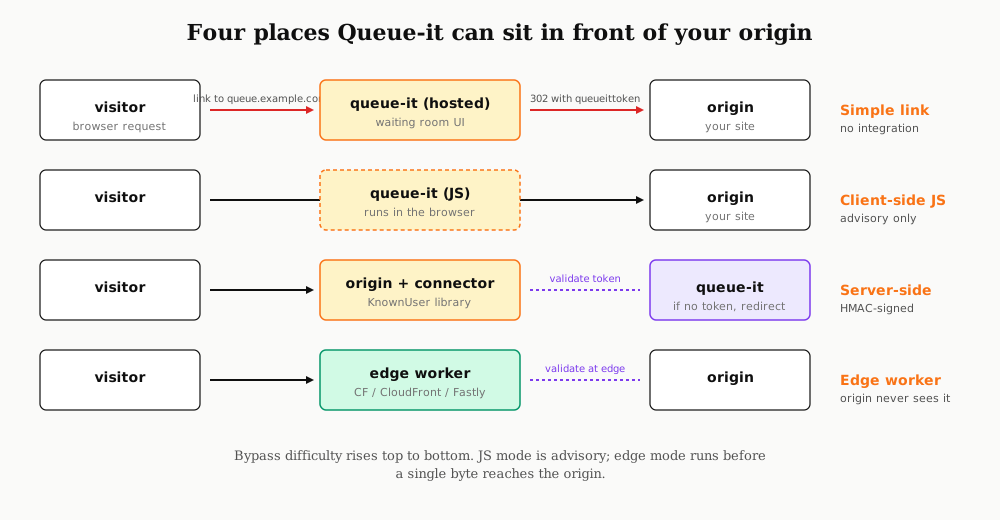
The simple-link mode is the original product. The operator just sends visitors to a Queue-it-hosted URL like queue.brand.com (a CNAME to *.queue-it.net) and the waiting room handles everything. The origin doesn’t run any Queue-it code at all. After waiting, the visitor 302s back to the origin with a token in the URL. This is the easiest mode to integrate against and the lightest to navigate; if the origin doesn’t verify the returned token, an HTTP client can just request the origin directly.
The client-side JavaScript mode is more common. The operator drops a <script> tag onto every protected page. On page load, that script asks Queue-it whether the visitor should be queued, and if so, redirects the browser to the waiting room. This runs in the browser-controlled execution layer. An HTTP client that doesn’t execute JavaScript (requests, httpx, curl, most production-shape clients) simply sees the underlying page render. That’s just a property of how HTTP clients work.
The server-side connector mode is where the real protection lives. Queue-it publishes open-source KnownUser libraries for Node.js, PHP, Python, Java, Ruby, and .NET. The library runs on the origin’s request path, computes whether the current request needs to be queued, and either lets it through or returns a 302 to Queue-it. Validation happens with an HMAC-SHA256 signature using the customer’s 72-character secret key. A client navigating this mode has to actually go through the queue and bring back a valid token.
The edge connector mode is the same logic but run on Cloudflare Workers, AWS Lambda@Edge / CloudFront, Fastly Compute@Edge, or Akamai EdgeWorkers. The origin never sees an unqueued request because the worker rejects it at the CDN edge, often hundreds of kilometres before the request would have reached the application. This is where high-value drops live now: ticket release pages, government appointment booking, sneaker raffles.
The difficulty curve for a client goes top to bottom. Simple-link is trivial. Client-side JS is just “don’t run the script.” Server-side and edge connectors put a cryptographic check on the request path; the client has to obtain a valid token, which means going through the queue.
What lands in your headers
The cleanest way to understand the system is to actually watch it work. Queue-it runs a public demo at queueitcom.queue-it.net/?c=queueitcom&e=wrdemoproduct that anyone can hit. A bare curl against that URL returns a 200 with these response headers, paraphrased:
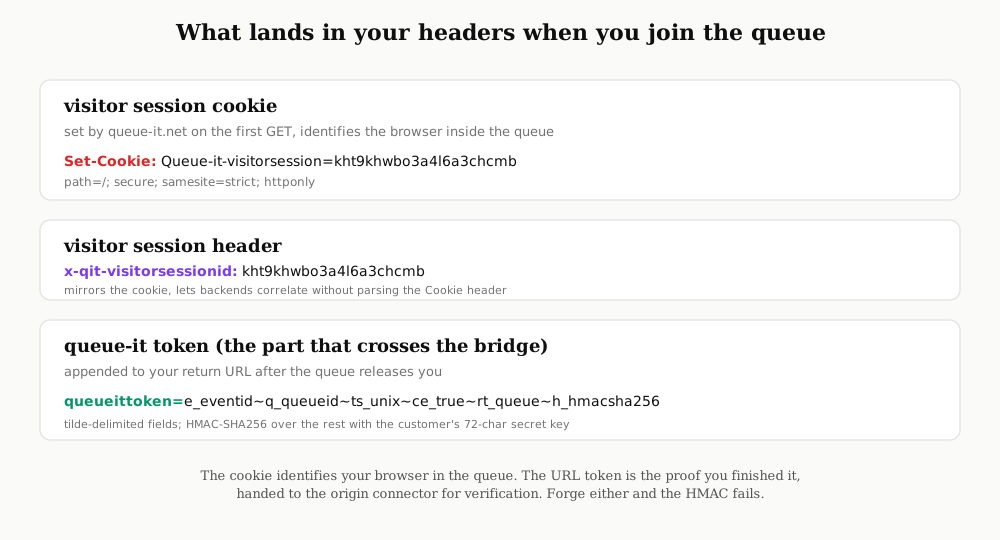
The Queue-it-visitorsession cookie is a short random identifier the queue-it.net host drops on the first request. It’s strict-samesite, secure-only, HttpOnly. The x-qit-visitorsessionid response header carries the same value, so origin code can correlate the visitor without parsing the Cookie header. That cookie is what keeps a visitor anchored to their place in line across page reloads. Lose the cookie, and as far as the queue is concerned, you’ve never been there.
The piece that crosses the bridge from Queue-it back to the origin is the queueittoken URL parameter. After the waiting room releases a visitor, their browser is 302’d to the operator’s original target URL with ?queueittoken=... appended. The token is a tilde-delimited bag of fields: event ID, queue ID, a Unix timestamp, the cookie validity flag, a redirect type, and a final HMAC-SHA256 over the rest using the customer’s secret. The connector on the origin side checks that signature before letting the request through. Drop the token, and the connector either rejects you or redirects you back to the queue.
This is the place where every browser does this work invisibly. An HTTP client that wants to behave the same way needs a cookie jar that respects strict-samesite and HttpOnly semantics, follows the 302 chain, and keeps the queueittoken URL parameter intact on the final landing. The token has a timestamp and a cookie-validity window. Outside that window, the connector rejects it. Inside that window, it’s tied to the visitor session cookie, so a token without the matching cookie isn’t useful. The cookie is the anchor; the token is the proof.
The challenge stack
What public docs do not tell you is that the queue page itself is layered on top of an entire challenge stack. I learned this by reading the inline JavaScript config block on the live demo page.
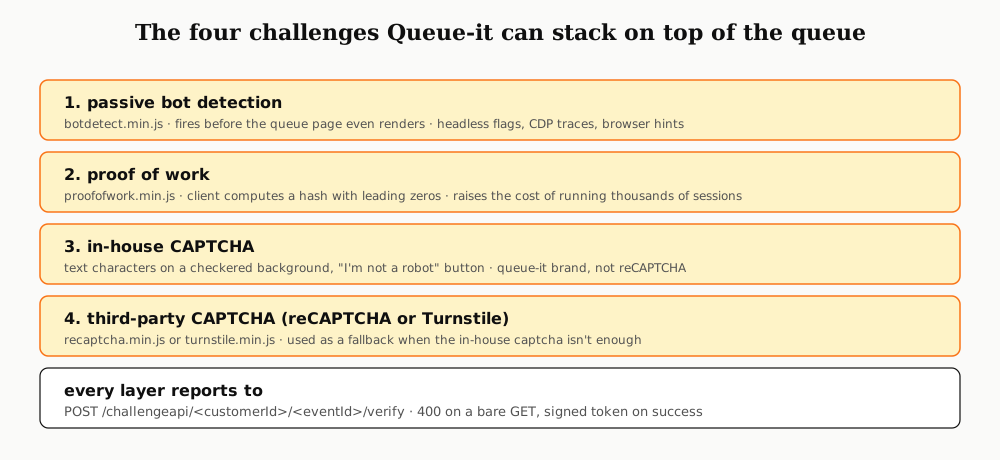
There are four challenge mechanisms wired in. The first is a passive bot-detection script, loaded from assets.queue-it.net/static/challenge/script/par-eu-west-1-b/botdetect.min.js. (The par-eu-west-1-b segment is an AWS Paris region label.) The second is a proof-of-work module, proofofwork.min.js, which makes the client compute a hash with a target difficulty before the queue page accepts the visitor. The third is Queue-it’s own CAPTCHA, a text-on-checkered-background design that does not use reCAPTCHA infrastructure. The fourth is a fallback to Google reCAPTCHA or Cloudflare Turnstile when the in-house challenge isn’t enough.
All four feed into a single endpoint, POST /challengeapi/{customerId}/{eventId}/verify, which returns a signed continuation token if the challenge passes and an error otherwise.
Here’s what fired the first time I pointed a headless Chrome at the demo:
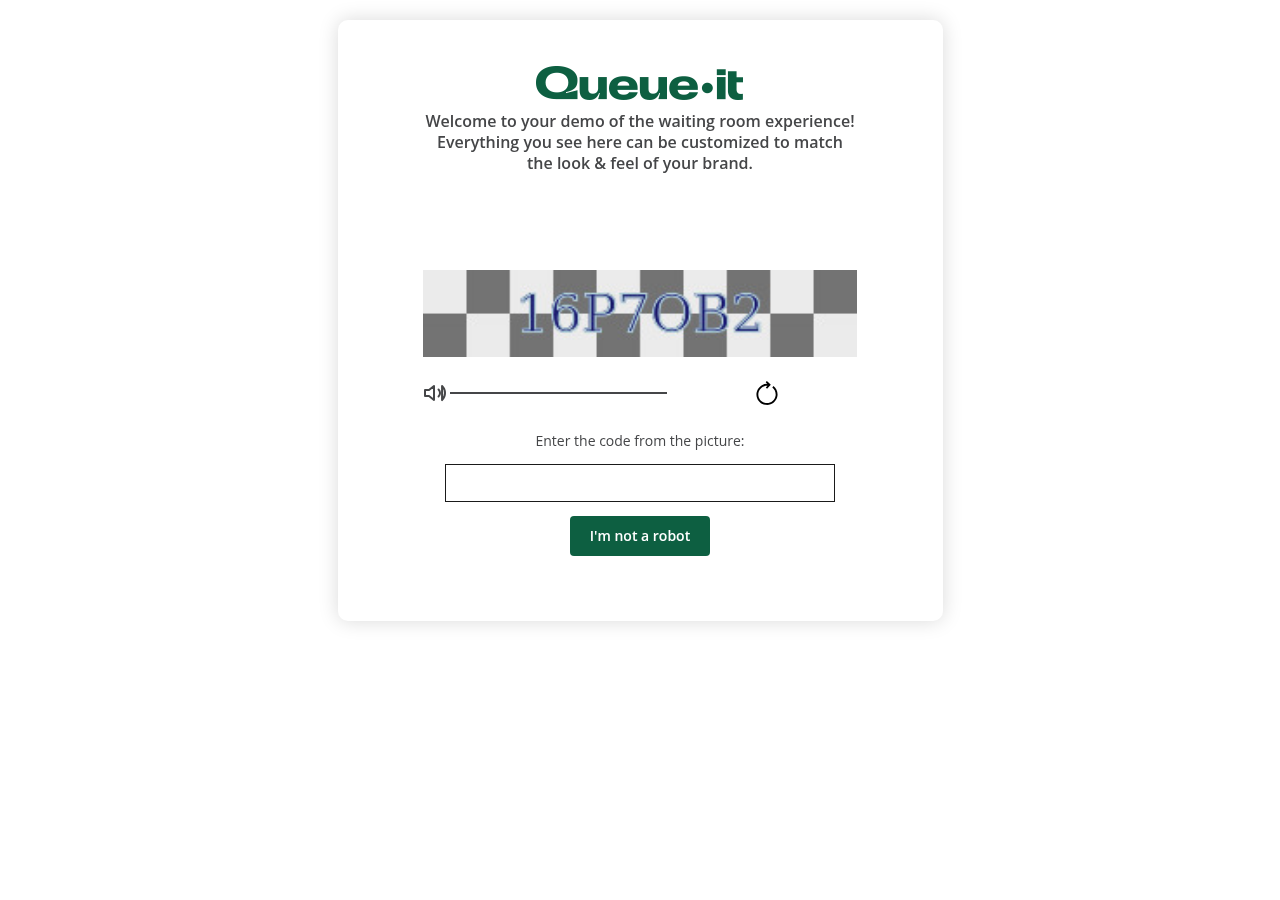
The bot-detect layer caught the headless flag before the actual waiting room had even loaded. The visitor never saw the queue, just the CAPTCHA. A client that looks like a real browser, with consistent user-agent strings, client hints, TLS fingerprint, screen size, and interaction patterns, doesn’t trip this layer. A client that looks like a default headless Chrome does.
The proof-of-work layer is the next concern. Every additional bit of target difficulty doubles the CPU and wall-clock cost for the client and barely costs the operator anything. Queue-it can tune the difficulty per event, raising it when they see high-volume traffic patterns. For a single client navigating the queue legitimately, the cost is small. For a client trying to run thousands of sessions in parallel, the cost compounds.
The five layers a client has to handle
Once you understand the four integration modes and the challenge stack, the engineering task becomes concrete. There are five layers any HTTP client has to handle correctly to walk through Queue-it the way a browser does, and each has a specific shape.
The first is JavaScript execution semantics. In client-side mode, the queue is implemented by a script tag. A client that runs JavaScript (a headless browser, a Playwright-driven session) will see the redirect fire and follow it. A client that doesn’t (a plain requests or httpx session) will see the underlying page render as if the queue weren’t there. Both behaviors are correct for what they are; the right one depends on whether your client is browser-shape or HTTP-shape.
The second is endpoint coverage. The connector only fires on URLs that match the operator’s trigger configuration. If a trigger covers /buy but the application also serves /checkout/api/v2/place-order, a client hitting the second endpoint goes straight to the origin without ever touching the queue. This is the most common source of operator misconfiguration: incomplete trigger coverage. A well-modelled client maps the trigger paths and chooses the entry endpoint accordingly. A well-modelled deployment closes the gap by wrapping every entry point with the same connector.
The third is mobile and API parity. A site might queue its web checkout flow but expose a mobile-app API that hits the same backend without going through the connector. Clients that target the mobile path see no queue. This is a parity problem for the operator, not the client; a properly-deployed Queue-it integration covers every entry point, web and mobile.
The fourth is cookie and token lifecycle. The visitor session cookie has a configurable validity window, often around fifteen to thirty minutes after the visitor leaves the queue. Inside that window, the same browser (and so the same client with the same cookie jar) can reload the protected page without re-queueing. That’s normal session behavior. The matching queueittoken URL parameter has its own timestamp and validity, and the connector checks both. A client that wants to behave well across reloads has to keep the cookie jar persistent across the session.
The fifth is running multiple sessions in parallel. A real user with two tabs open is doing this naturally. A client doing the same thing is doing it at scale. Queue-it has two defenses against the scaled version: the bot-detect and CAPTCHA layer in front of the queue, and per-IP plus per-fingerprint rate limiting before the queue is even reached. These defenses fire regardless of intent. A client that runs many sessions from the same IP or the same fingerprint will get challenged or blocked.
None of these five layers includes forging a Queue-it token. The token is HMAC-SHA256-signed with the customer’s 72-character secret key, which lives on the origin and never crosses the wire. Without the key, you can’t produce a valid token; with the key, the integration would already be compromised.
Why latency matters more than anything else
The most interesting practical work in this space isn’t getting around the queue, it’s being early into it. The waiting room is first-come first-served. If a client joins three seconds before everyone else, it gets a position three seconds ahead. Three seconds, on a drop with a million people, is the difference between buying and not.
So the engineering reduces to round-trip latency from the client to whichever Queue-it datacenter is hosting that particular event.
Queue-it runs across at least the EU (Paris, Frankfurt), US (Virginia, Oregon), and Asia (Tokyo, Sydney) AWS regions, plus Azure deployments for some enterprise customers. The asset region for a given event is visible in the static script URLs: the demo I inspected was on par-eu-west-1-b, which is Paris, eu-west-1, availability zone b. Putting a client (or a residential proxy chain) near that region’s edge shaves enough milliseconds to matter.
This is the actual operational moat. The queue is fair within the constraint that the visitor with the best network position gets the best queue position. That constraint is precisely what people pay broker services to optimize.
Operate within the rules of the road
This space has laws around it, particularly in ticketing. The United States has the Better Online Ticket Sales Act of 2016, and most major jurisdictions have analogues. Read your target site’s terms of service and the applicable laws before you point production traffic at anything you don’t own. The authorised testing target for everything in this post is Queue-it’s own demo at queueitcom.queue-it.net, which they publish for exactly this purpose.
What an operator sees from the other side
If you run a site that uses Queue-it, the operator-side reading of this post is short.
Don’t ship in client-side JavaScript mode for any event where queue position matters. JS mode is fine for fairness optics on a moderately-busy page. It’s not fine for a Taylor Swift release or a passport appointment window.
Wrap every entry point with the same connector, not just the web checkout. That includes mobile API endpoints, partner APIs, internal admin routes, anything that touches the same downstream system. The most common gap in 2026 is still a misconfigured trigger that leaves a mobile API path uncovered.
Deploy the connector at the edge if you have a CDN that supports it. Cloudflare Workers, Lambda@Edge, Fastly Compute@Edge, and Akamai EdgeWorkers all have official Queue-it connectors. The origin should never see an unqueued request for a queued event.
Keep cookie validity short, ideally minutes, not hours. The longer the window, the more useful a captured session becomes.
Lean on Queue-it’s own bot-detection and CAPTCHA layer. It’s there for a reason. The proof-of-work tax is the cheapest defensive primitive on the menu against high-parallelism clients.
Rotate the customer secret key if you suspect compromise, and store it like you’d store a TLS private key. Anything else and the cryptographic guarantee evaporates.
What this all means
Handling Queue-it correctly in a client comes down to behaving like a browser at every layer the server checks. Honour the redirect when it fires. Keep the cookie jar persistent and respect strict-samesite. Carry the queueittoken parameter forward on the post-queue landing. Stay within plausible browser-shape on fingerprint, TLS, and timing. Pay the proof-of-work cost when it’s asked. Solve the CAPTCHA when it’s served, or look like a client that never needs to.
The cryptographic primitives are sound, the connector libraries are open source and well-reviewed, and the challenge stack on top of the queue raises the per-session cost enough that the only realistic path through is through. The interesting engineering work is at the edges: which endpoint is the right one to enter at, which region is the closest to the event’s datacenter, how to keep a session warm across a reload, how to make a client’s network shape look like the browser shape the operator’s bot-detect layer expects.
Virtual waiting rooms are one of those quiet pieces of internet infrastructure that almost nobody outside the operator’s engineering team thinks about until they’re stuck in one. They’re also one of the cleaner examples of a system that started as advisory client-side code and grew into a layered, cryptographic, edge-deployed control. The pattern keeps showing up. The earlier you understand which layer of a system is doing the actual work, the less time you waste modelling the layer that isn’t.
Further reading
Queue-it's architecture: the queue token, the cookie, and safety-net mode
Traces Queue-it's edge and server-side connector model from the inside: how the queue token is signed and parsed, how the QueueITAccepted cookie is minted and re-validated, and how safety-net mode and triggers decide who waits.
·19 min readHow virtual waiting rooms work: token buckets, queue position, and fair ordering
A vendor-neutral reference on virtual waiting rooms: the admission model behind the token bucket, FIFO versus random ordering, the cookie that holds your place, and the split between inbound and active users.
·22 min readThe Ticketmaster Verified Fan system: queueing, identity, and bot defense
How Ticketmaster's layered defense fits together: pre-registration identity gating, the randomized waiting room, rotating-barcode SafeTix, and the scalper arms race, read through the 2022 Taylor Swift collapse.
·20 min read